Roselia: A Handmade Maker’s Go-To Display Font
I remember the exact moment I first opened Roselia. I was sitting at my kitchen table, a stack of kraft paper labels in front of me, trying to decide on a font for a new batch of soy candles. Everything I tried felt either too serious or too playful—nothing landed right. Then I previewed Roselia, and something clicked. The clean shapes, the soft edges, the way each letter sat naturally on the line—it looked like it had been waiting for a label. I typed “Lavender + Sea Salt” and watched it transform into something I actually wanted to print. That’s the kind of font Roselia is: not complicated, not fussy, just right.
What Roselia Brings to the Table
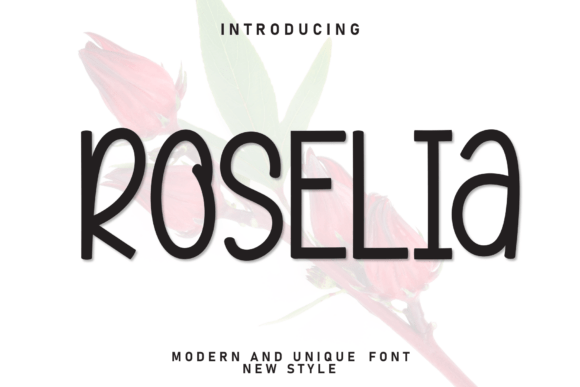
Roselia is a casual display font designed for makers who want warmth without losing clarity. It blends modern simplicity with a playful, approachable mood. The letterforms are well-balanced, with soft curves that feel inviting rather than rigid. It’s not trying to be a vintage script or a bold headline—it lives in that sweet spot between polished and handmade. For someone like me, who runs a small shop selling printable wall art and packaged gifts, that balance is everything. I need a font that looks professional but still feels personal. Roselia does that.
Its visual personality is relaxed and cheerful. The rounded terminals and open counters give it a light, airy quality. It doesn’t shout for attention—it earns it quietly. When I use it on a greeting card, it reads like a friendly note. When I put it on a mug design, it feels like a gift from someone who actually cares about the details. That emotional appeal is hard to find in a lot of display fonts, which often lean too decorative or too sterile. Roselia sits in the middle, and that’s its strength.
From Labels to Logos: Real Product Uses
I’ve used Roselia on everything from candle labels to wedding welcome signs. Let me walk you through a few specific projects where it became the star.
First, the candle labels. I sell small-batch soy candles in amber glass jars, and the label is a 2x3 inch oval. With Roselia, I can fit a short phrase like “Cozy Cabin” or “Morning Light” in a single line, and it reads clearly even at that size. The soft edges don’t get lost in the ink, and the letter spacing stays open enough that the words don’t feel cramped. I pair it with a clean sans serif like Montserrat for the scent notes and ingredients, and the contrast is perfect—Roselia draws the eye, and the sans serif handles the details.
Then there’s the greeting cards. I design a set of birthday cards that feature a big, single word like “Celebrate” or “Cheers” across the front, with a small sentiment inside. Roselia works beautifully for that single word because it has enough personality to carry the design. I’ve also used it on the back of the card for my shop logo, and it gives the brand a consistent, friendly look. Customers tell me they love the “hand-lettered feel” without realizing it’s a font—and that’s exactly the goal.
Packaging, Tags, and That Finished Look
Boutique packaging is another area where Roselia shines. I make small gift tags for my market stall—just a piece of cardstock with a hole punch and twine. Using Roselia for the tag text, like “Thank You” or “Handmade with Love,” makes the whole package feel intentional. Even when I’m just printing on my home inkjet, the font holds up. The clean shapes don’t get muddy, and the soft edges don’t create jagged lines. That’s important for makers who don’t have access to professional printing equipment.
For digital products, like printable wall art, Roselia is a dream. I create a series of farmhouse-style prints with motivational quotes, and the font sits perfectly in a frame. The readability is strong for short phrases and titles, but I wouldn’t use it for long paragraphs. It’s designed as a display font, so it shines when it’s the main event—not the supporting text. For a print that says “This Is Our Happy Place” in a classic wooden frame, Roselia feels like the right choice. It’s modern but not cold, playful but not childish.
Seasonal Crafts and Special Occasions
Seasonal products are a big part of my shop, and Roselia adapts well. For holiday tags, I set “Merry & Bright” or “Joy to All” in the font, and it picks up the festive mood without looking like a cliché. For Easter, I used it on a set of printable egg labels, and the soft edges made the text feel like it belonged on a pastel background. The versatility comes from that neutral warmth—it doesn’t force a specific season, so you can use it year-round.
Wedding invitations are another natural fit. I designed a simple welcome sign for a friend’s outdoor wedding, with “Welcome to Our Love Story” in Roselia on a rustic wooden board. The font’s approachable style made the sign feel inviting, not formal. For the actual invitation suite, I paired it with a simple serif for the body text, and the combination felt thoughtful and cohesive. If you’re designing wedding stationery, Roselia works well for names, titles, and short phrases like “Save the Date” or “Together Forever.”
Practical Tips for Cutting Machines and Printers
If you’re using a Cricut or Silhouette to cut vinyl for mugs, shirts, or tote bags, here’s what I’ve learned: Roselia’s clean shapes make it relatively easy to weed. The open counters and moderate stroke widths mean the vinyl doesn’t fall apart on small details. I’ve cut it at 1.5 inches tall for a mug design, and the letters held together perfectly. For intricate cuts, just make sure you’re using a good quality vinyl and a fresh blade—standard advice, but worth repeating.
For stickers, Roselia prints well at small sizes. The soft edges don’t become fuzzy when printed on a matte vinyl sheet. I’ve tested it on glossy paper too, and it looks crisp. The key is to keep the text size above 12pt for physical products; any smaller and the fine details might blur on an inkjet. For digital previews on Etsy or your shop, you can go smaller since screen resolution handles it better.
Font Pairing Suggestions
Roselia pairs naturally with a clean sans serif for body text or secondary information. I’ve used it with Montserrat, Lato, and Open Sans, and all three work well. The contrast between Roselia’s rounded, casual shapes and a straightforward sans serif creates a balanced layout. If you want a more romantic feel, try pairing it with a simple serif like Playfair Display or a handwritten script like Allura. For a bold, modern look, a heavy display font like Anton can create a striking contrast. Avoid pairing it with another casual display font, though—it can feel too similar and lose the hierarchy.
Licensing and File Formats
Before you start selling products, check the commercial license for Roselia. Most premium fonts require a license for physical goods, templates, or digital downloads. Make sure you know whether the license covers SVG-style designs for print-on-demand, or if you need an extended license for merchandise. The file formats should include OTF and TTF, and possibly WOFF for web use. Multilingual support is also worth checking if you plan to sell internationally. I always print the license confirmation and keep it in my files, just in case a platform asks for proof.
Roselia has become a staple in my design toolkit. It’s the font I reach for when I want something that feels handmade without looking homemade. It’s the font that turns a label into a brand, a card into a keepsake, a sign into a welcome. If you’re a maker looking for a display font that actually works across real products, give Roselia a try. It might just become your new favorite, too.